Cheap cables stop working within months. Some charge painfully slowly. Others don't support fast charging at all, even when the box says otherwise. Most buyers compare cables on price alone and end up back at the counter a few weeks later.
This guide breaks down the factors that actually matter before buying a charging cable, so you end up with one that's faster, safer, and built to last rather than another one that frays at the connector by next month.
Why Choosing the Right Charging Cable Matters
A cable isn't just a wire between a charger and your phone. It directly affects charging speed, data transfer, and, over time, your device's battery health. A poor-quality cable can bottleneck a fast charger down to a fraction of its rated output, and a cheaply made one is also the first thing to fail, usually at the connector, well before the charger or your phone shows any wear.
1. Check the Charging Speed Support
USB-A vs USB-C
USB-A is the older, rectangular connector still found on some budget chargers and power banks. USB-C is the newer, reversible connector now standard across most phones, tablets, and laptops. A USB-C to USB-C cable typically supports higher wattage and faster charging than a USB-A cable, since USB-A itself caps out at lower power delivery.
If you're on an iPhone that hasn't moved to USB-C, you'll need USB-C to Lightning specifically, not USB-C to USB-C.
One thing worth remembering: not every cable supports fast charging even if the connector shape matches and the charger itself does. The cable has its own separate rating, and that's the one people usually overlook.
2. Understand Wattage Support
Cables are rated for a maximum wattage, just like chargers. Common ratings include 18W, 25W, 45W, 60W, 100W, and 240W under the USB Power Delivery 3.1 standard. A cable rated below your charger's output becomes the bottleneck in the chain, no matter how capable the charger is.
Device | Recommended Cable Rating |
Smartphone | 60W |
Tablet | 60W–100W |
Laptop | 100W or higher |
Gaming handheld | 100W |
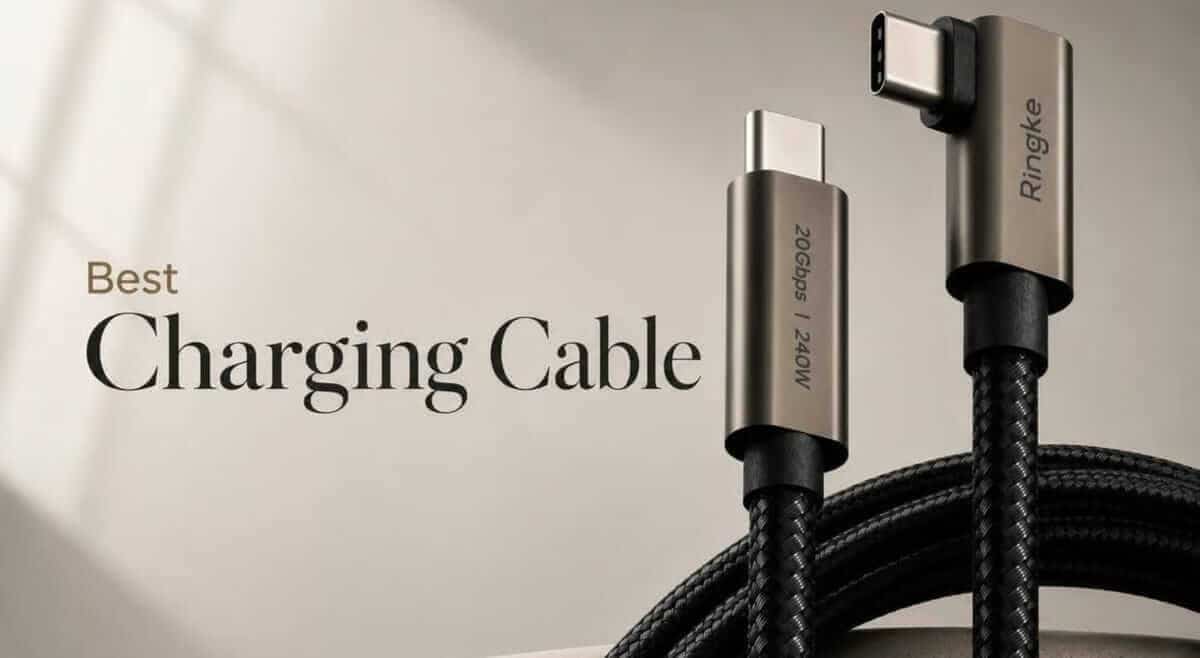
If you're covering the higher end of that range, Ringke's 90-Degree USB-C Cable (1m, 240W) and 90-Degree USB-C Cable (2m, 240W) both meet the 100W+ threshold laptops and gaming handhelds need.
3. Cable Material Makes a Big Difference
PVC is the standard rubber-like coating on most budget cables. It's affordable, but less durable, and tends to crack or stiffen with age, especially with repeated bending near the connector.
Braided nylon costs a bit more but holds up considerably better. It resists tangling, flexes without weakening, and generally survives years of daily use where a PVC cable would already be fraying.
Reinforced connectors matter more than most buyers realize. The point where the cable meets the plug is where nearly all cable failures start, from constant bending during daily charging. A cable with proper strain relief at the connector is usually the difference between a cable that lasts one year and one that lasts three.
4. Choose the Correct Cable Length
Common lengths run from 0.5m up to 2m. Longer isn't automatically better: very long cables can experience a bit more voltage drop, which matters slightly for high-wattage charging, and they're less practical if you're travelling or working at a small desk. A 0.5m–1m cable, like Ringke's 0.5m 60W USB-C to USB-C cable, suits a desk setup or travel bag well, while a 1.5m–2m cable is better for charging from a distance, like a bedside table across the room from an outlet.
5. Charging Speed Isn't Only About the Charger
Charging speed depends on three components working together: the charger, the cable, and the device. Whichever one has the lowest rating sets the actual speed. A 100W charger paired with an 18W-rated cable still only delivers 18W. This is the single most common reason people assume their "fast charger" isn't working properly, when the cable is the actual limit.
6. Data Transfer Support
Charging cables also move data, and speeds vary a lot more than people expect. USB 2.0 tops out around 480Mbps. USB 3.2 pushes into the multiple-gigabit range. USB4 and Thunderbolt-compatible cables go even further, relevant mainly if you're transferring large video files or backing up a phone regularly. If you only ever use a cable to charge, this spec matters less, but it's worth checking if you shoot 4K video or move files often.
7. Safety Features You Should Never Ignore
Look for overheating resistance, solid internal wiring, and connectors that don't wobble in the port. Poor-quality cables with thin, uncertified wiring are more likely to cause inconsistent charging, run hot during use, or wear out well before their expected lifespan. This isn't just a durability issue, it's also what keeps charging stable and safe over hundreds of charge cycles.
8. Compatibility Checklist Before Buying
Before buying, confirm the cable works across what you actually own:
Android phones
Samsung Galaxy devices
Google Pixel devices
Nothing Phone devices
Tablets
Power banks
Laptops
iPhone (USB-C or Lightning, depending on model)
9. Signs You're Buying a Low-Quality Cable
Priced far below every other option in the category
No wattage rating listed anywhere
A connector that feels loose or wobbles in the port
A noticeably thin or flimsy wire
Poor or inconsistent reviews
No warranty offered
Vague or missing specifications altogether
10. How to Choose the Best Charging Cable for Your Needs
Daily charging: a mid-length, mid-wattage cable (60W, 1m) covers most everyday use without hassle.
Office: a slightly longer cable (1.5m–2m) works better at a desk where the outlet isn't right next to you.
Travel: a shorter, high-wattage cable that can double up for your laptop reduces what you need to pack.
Gaming: handhelds draw more power during active use, so a 100W-rated cable keeps up better than a basic one.
Laptop charging: always go 100W or higher, and confirm your laptop supports USB-C Power Delivery before assuming any cable will work.
Car charging: shorter cables (0.5m–1m) reduce clutter and reach the charging port without excess slack across the seat.
Why a Durable Charging Cable Saves Money Over Time
A ₹1,500–2,000 braided cable that lasts three years works out cheaper than replacing a ₹300 PVC cable every two to three months over the same period, and that's before accounting for the time spent constantly reordering and waiting for a replacement to arrive.
Conclusion
The best charging cable isn't simply the cheapest one or the one with the highest wattage printed on the box. The right choice comes down to compatibility, power support, durability, connector quality, data transfer needs, and how you actually use it day to day. A reliable cable improves charging performance, protects your devices over time, and cuts down on how often you're back at the counter buying another replacement. Browse Ringke's full range in the Power Cables and Adapters collection and the GaN Charger collection.
Frequently Asked Questions
Which charging cable is best for fast charging?
Choose a cable that supports the wattage required by both your device and charger, with USB Power Delivery (PD) support if your setup uses it.
Does every USB-C cable support fast charging?
No. USB-C describes the connector shape, not the charging speed. Two USB-C cables can look identical while supporting very different wattage ratings, so always check the specific rating rather than assuming from the connector alone.
Are braided charging cables better?
Generally yes. Braided cables tend to resist everyday wear, bending, and tangling far better than standard PVC cables, which is why they typically last longer under daily use.
Can I use a 100W cable for a phone?
Yes. A higher-rated cable is safe with lower-powered devices, since the connected device only draws the power it actually needs, never more than its own charging capacity.
Does cable length affect charging speed?
Longer cables can experience slightly more resistance, but a well-made cable rated for its stated power keeps this effect minimal in everyday use.
How often should I replace a charging cable?
Replace it if you notice fraying, exposed wiring, a loose connector, inconsistent charging, or any visible damage. A well-made cable can last for years with normal care.