Phones aren't cheap, and neither are the repairs when one takes a bad fall. A protective phone case is the simplest way to reduce that risk, but not every case offers the same level of protection. Knowing what to actually look for makes the difference between a case that works and one that just looks like it does.
This guide breaks down the features that matter most when choosing a protective phone case, so you know exactly what to check before you buy.
Why Phone Case Protection Matters
Most phone damage doesn't happen from dramatic accidents. It happens from everyday moments: a phone slipping off a couch cushion, sliding out of a loose pocket, or getting knocked off a table edge. A well-designed case absorbs and redirects that impact energy instead of letting it transfer straight to the screen or the corners, which are usually the first parts to crack.
Beyond drops, cases also guard against scratches from keys and coins, dust buildup in ports, and general wear from daily handling. A protective back cover keeps the phone's finish intact too, which matters if you plan to resell or exchange the device later.
Key Features to Look for in a Protective Phone Case
Shock Absorption and Drop Protection
This is the core job of any protective case. Look for a case built with shock-absorbing materials, usually a TPU (thermoplastic polyurethane) inner layer combined with a harder outer shell. TPU flexes on impact and disperses the force instead of transferring it directly to the phone. A hard outer shell adds structural rigidity so the case doesn't deform easily.
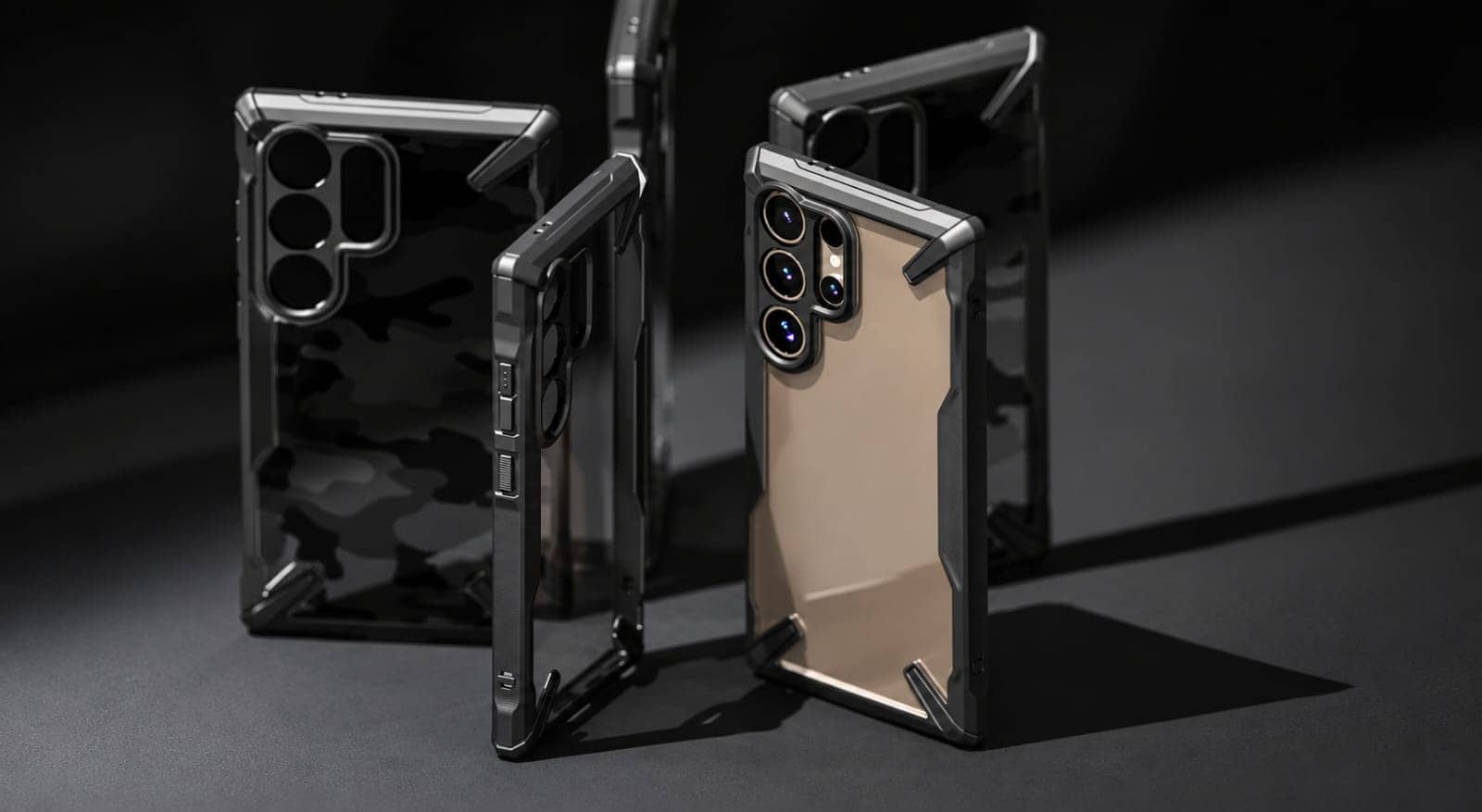
Reinforced corners are worth checking for specifically. Most drops land on a corner, so a case with extra cushioning or raised material at the corners tends to hold up better than one with uniform thickness throughout.
Raised Edges for Screen and Camera Protection
A case that sits flush with your screen and camera lenses isn't doing its full job. Look for raised bezels around the screen and a raised lip around the camera module. When the phone lands face down or camera down, these raised edges take the contact first instead of the glass.
Camera protection deserves particular attention on newer phones, since camera modules now protrude further and hold multiple lenses that are expensive to replace individually. A case with a properly raised camera ring, sometimes with an added camera protection insert, reduces the chance of the lenses making direct contact with a hard surface.
Material and Build Quality
Not all TPU or polycarbonate is made the same. Cheaper materials can feel grippy out of the box but turn sticky, yellow, or brittle within months. Better-quality cases use materials treated to resist discoloration and degradation over time.
It also helps to check how the case is put together. Visible seams, uneven edges, or ports that don't quite line up usually point to lower manufacturing tolerances, which can affect how well the case protects over time.
Fit and Weight
A protective case should feel like a natural extension of the phone, not an add-on you're constantly aware of. Look for a case that matches your phone's exact dimensions, adds a reasonable amount of thickness for the protection it offers, and doesn't feel like unnecessary dead weight in your hand or pocket.
Grip and Texture
A case that's hard to hold defeats part of its own purpose. Textured backs, matte finishes, or slightly contoured edges all improve grip and reduce the chance of the phone slipping out of your hand in the first place. Smooth, glossy finishes look clean but tend to be more slippery, especially with sweaty or wet hands.
Precise Cutouts and Button Response
This is easy to overlook but affects daily usability. Poorly aligned cutouts can muffle speakers, block microphones, or interfere with wireless charging coils. Button covers that are too stiff or too loose make volume and power buttons frustrating to press. A well-made case matches the phone's exact cutout dimensions, including charging ports, speaker grilles, and camera openings.
Final Thoughts
A protective phone case earns its place through details you might not notice until you need them: how the corners absorb an impact, how far the bezel sits above the glass, whether the material holds up after months of use. These are the things worth checking before you buy, not just the price or the color options.
Explore our Protective Phone Cases to find a case built around these features for your phone model.
Frequently Asked Questions
What makes a phone case "protective" rather than just decorative?
A protective case is built with materials and design features specifically meant to absorb impact and shield the phone, such as shock-absorbing TPU, raised edges around the screen and camera, and reinforced corners. A decorative or purely cosmetic case may look similar but often lacks these structural elements.
Does a protective case affect wireless charging?
Cases made from TPU or polycarbonate at standard thicknesses generally don't interfere with wireless charging. Very thick cases, or ones with metal components like certain kickstands or card holders, can weaken the charging connection or slow it down.
Are protective cases still necessary if I have a screen protector?
Yes. A screen protector guards against scratches and minor surface impacts on the display, but it does nothing for the back, sides, or camera module. A case and a screen protector cover different areas and work best together.
How often should I replace a phone case?
There's no fixed timeline, but it's worth replacing a case once the material visibly cracks, the corners flatten out, or it no longer sits snugly on the phone. A worn-out case can protect less effectively than a new one, even without obvious damage.
Do thicker cases always protect better?
Not necessarily. Protection depends more on material quality, corner reinforcement, and raised edges than on raw thickness. A well-engineered slim case can still offer solid day-to-day protection.
What should I check before buying a protective case for a new phone?
Confirm the case is made specifically for your phone model, including camera cutout placement, since camera layouts change frequently between models. Beyond fit, check for reinforced corners, raised bezels, and clear cutouts for ports and buttons.